There’s a specific kind of keyboard shopper who wants two things that don’t always come in the same box: something that looks genuinely good on a desk setup, and something that actually holds up to daily typing without the mushy, cheap-feeling switches that usually come with “aesthetic-first” keyboards. The PIIFOX Luna Muse75 Pro is PIIFOX’s answer to that specific tension — a 75% mechanical keyboard built around their LUNA design language, which the brand describes as “smooth mechanical feel, clean acoustics, and flexible tri-mode control for work, play, and every desk setup in between.” After spending real time with it, here’s where that promise holds up, and where it’s worth tempering expectations.
What’s in the Box
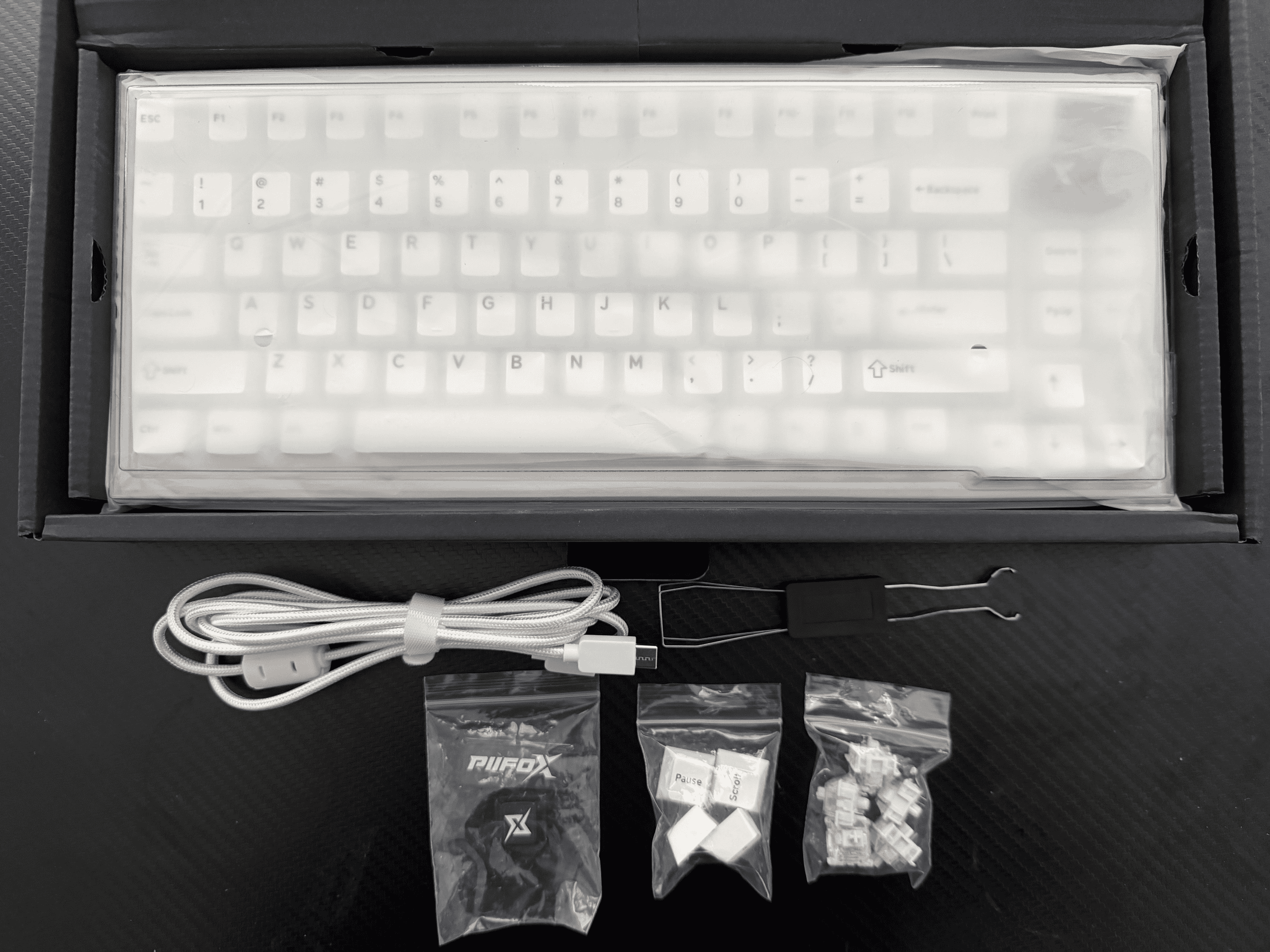
Unboxing the Muse75 Pro, PIIFOX doesn’t cut any corners on presentation or completeness. Inside, you get:
- The keyboard itself, factory-wrapped in plastic, in this case the white colorway with the full 75% layout intact
- A braided USB-C cable — a nice touch over the cheap rubber cables a lot of competitors still ship, and one less thing to replace down the line
- A combination keycap and switch puller tool, the bent-wire style that handles both jobs without needing two separate tools
- A small pouch with the PIIFOX branding, for stashing cables, spare parts, or the tools above when not in use
- A set of spare keycaps for less commonly used keys (Pause, Scroll Lock, and similar), so you’re covered if you ever want to mix in a different keycap profile without hunting down replacements
- A small bag of spare Jade Peak switches, ready to hot-swap in if one ever wears out or you want to experiment with feel — a genuinely practical inclusion rather than a token extra
- A small wireless dongle, tucked in for the 2.4GHz connection mode, easy to miss if you’re not looking for it
It’s a complete kit in the literal sense — everything you need to get the board running, maintain it, and even start hot-swapping switches is in the box on day one. Nothing about it feels like an afterthought.
First Impressions: A 75% Layout That Actually Feels Considered
The Muse75 Pro sits in PIIFOX’s 75% size category — meaning you keep your function row and arrow keys, but lose the numpad and dedicated navigation cluster that a full-size board carries. It’s the layout that’s become something of a sweet spot for people who want a compact desk footprint without sacrificing the keys they actually reach for daily.
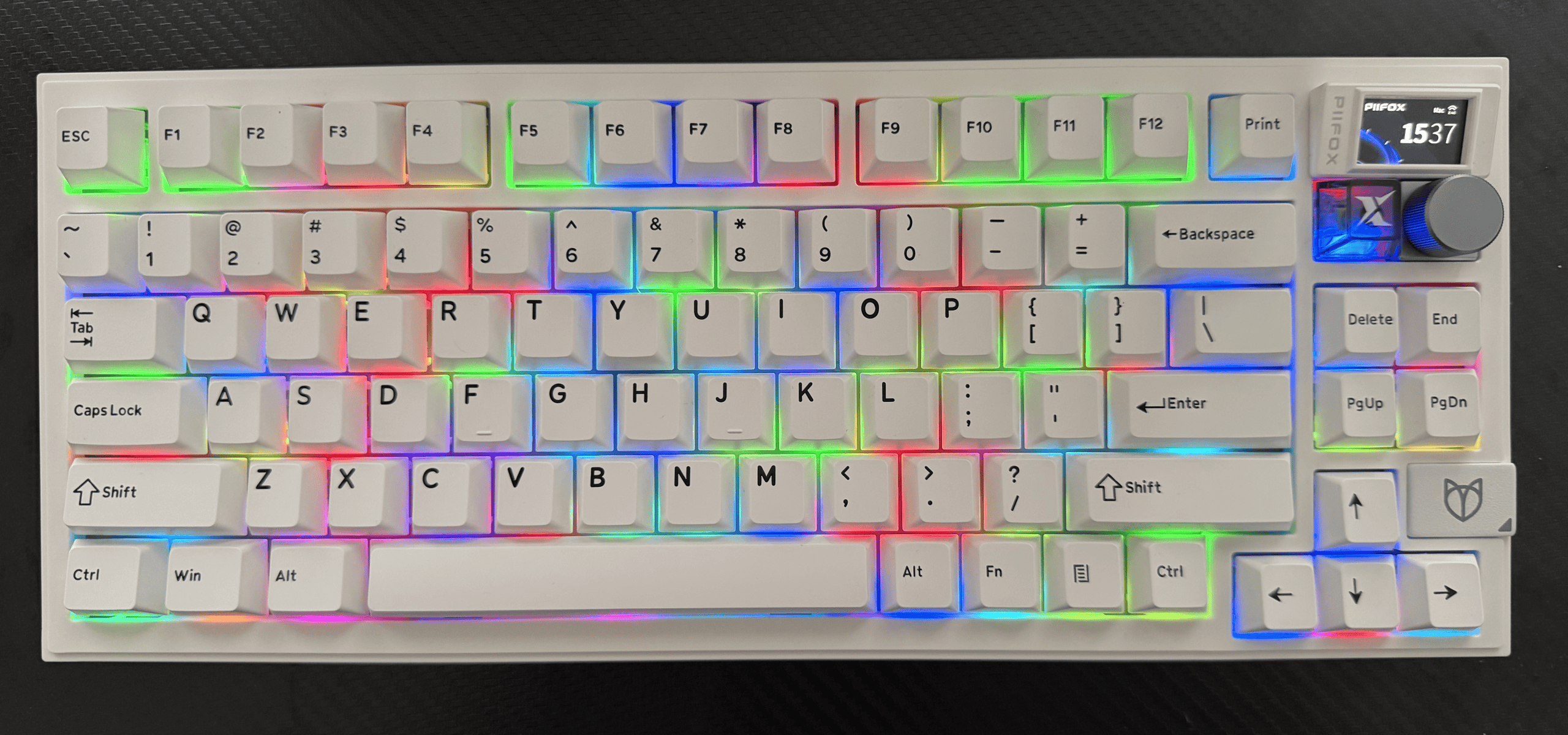
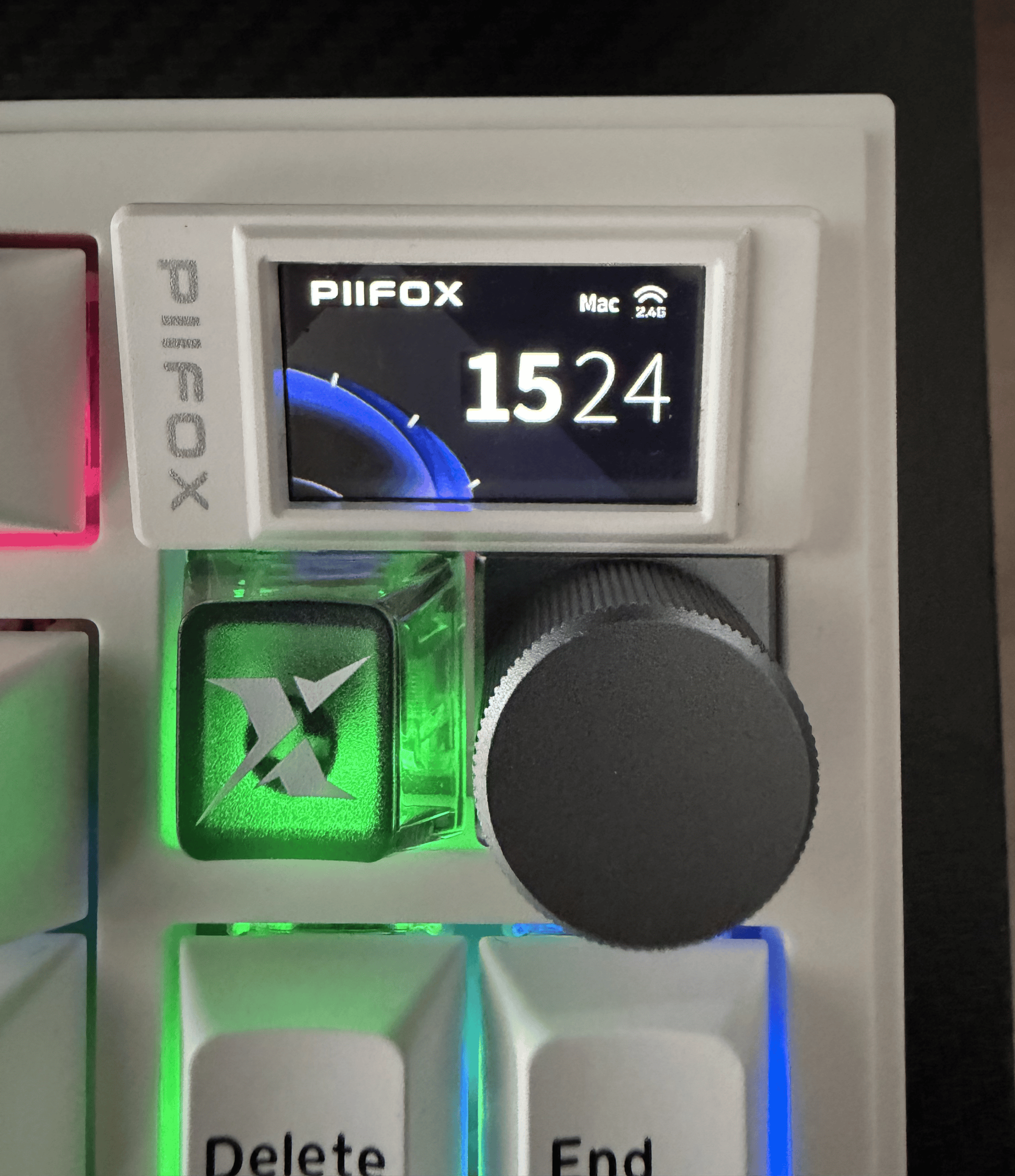
The first thing you notice is the metal knob in the top-right corner — a small detail, but one that immediately signals this isn’t a bargain-bin membrane board wearing a mechanical costume. It’s got real resistance and a satisfying click when pressed, and it’s genuinely useful for the basics: volume, media control, and RGB brightness, depending on how you configure it.
The second thing you notice is the smart LCD screen tucked into the board — a feature you don’t see often outside PIIFOX’s higher-end lineup. It supports custom GIFs, which sounds like a gimmick until you realize it’s actually the clearest expression of what PIIFOX’s brand is going for: a keyboard isn’t just an input device, it’s a piece of your desk’s personality.
Under the Hood: Tri-Mode Connectivity and an 8000mAh Battery That Actually Matters
Here’s where the Muse75 Pro moves from “nice looking” to genuinely practical for daily use.
- Tri-mode connectivity — Bluetooth, 2.4GHz wireless via USB dongle, and wired USB-C — covers essentially every way you’d want to connect a keyboard, whether that’s pairing with a laptop on the go, running low-latency wireless for gaming, or going fully wired when you don’t want to think about battery life at all.
- 8000mAh battery — this is a genuinely large capacity for a keyboard this size, and it shows in practice: multi-day use between charges is realistic even with the backlighting and LCD screen running, which is where a lot of competing tri-mode boards start to disappoint.
- PIIFOX Jade Peak switches — this particular Muse75 Pro unit ships with PIIFOX’s own Jade Peak mechanical switch: a light linear switch rated at 40±5gf operating force, 3.5mm total travel, factory-lubed 5-pin construction, and rated for up to 60 million keystrokes. In practice, that translates to an easy, low-effort keypress with a smooth, uninterrupted travel — closer to effortless than heavy, which suits both fast typing and casual gaming equally well.
- Multi-layer dampening for “pure acoustics” — this is the part that actually separates a good-sounding keyboard from a great-sounding one. Layered foam and structural dampening cut down on the hollow, tinny ping that cheaper boards suffer from, replacing it with a deeper, more consistent sound signature that doesn’t feel like an afterthought.
Typing Feel with the Jade Peak Switches
With the Jade Peak switches installed, the Muse75 Pro leans into a smooth, light, controlled linear feel rather than trying to be the loudest or clackiest board on your desk. At 40±5gf, the actuation force is genuinely easy on the fingers during long sessions — noticeably lighter than a lot of standard linear switches, without feeling mushy or imprecise. Combined with the board’s dampening layers, it lands in that satisfying middle ground: enough acoustic feedback to feel responsive and tactile, without turning into a distraction on a video call or in a shared office. For long typing sessions — writing, coding, day-to-day work — that light, consistent travel matters more than raw clack volume, and it’s an area where the Jade Peak switches and the Muse75 Pro’s tuning genuinely work well together.
Swapping Keycaps: Journal and Herbary Sets
This is where the Muse75 Pro’s hot-swappable design and PIIFOX’s broader “desk personality” philosophy really come together. Alongside the keyboard, PIIFOX also sent over two of their themed keycap sets — Journal and Herbary — to try on the board, and the difference each set makes to the keyboard’s entire character is genuinely bigger than you’d expect from “just” a keycap swap.
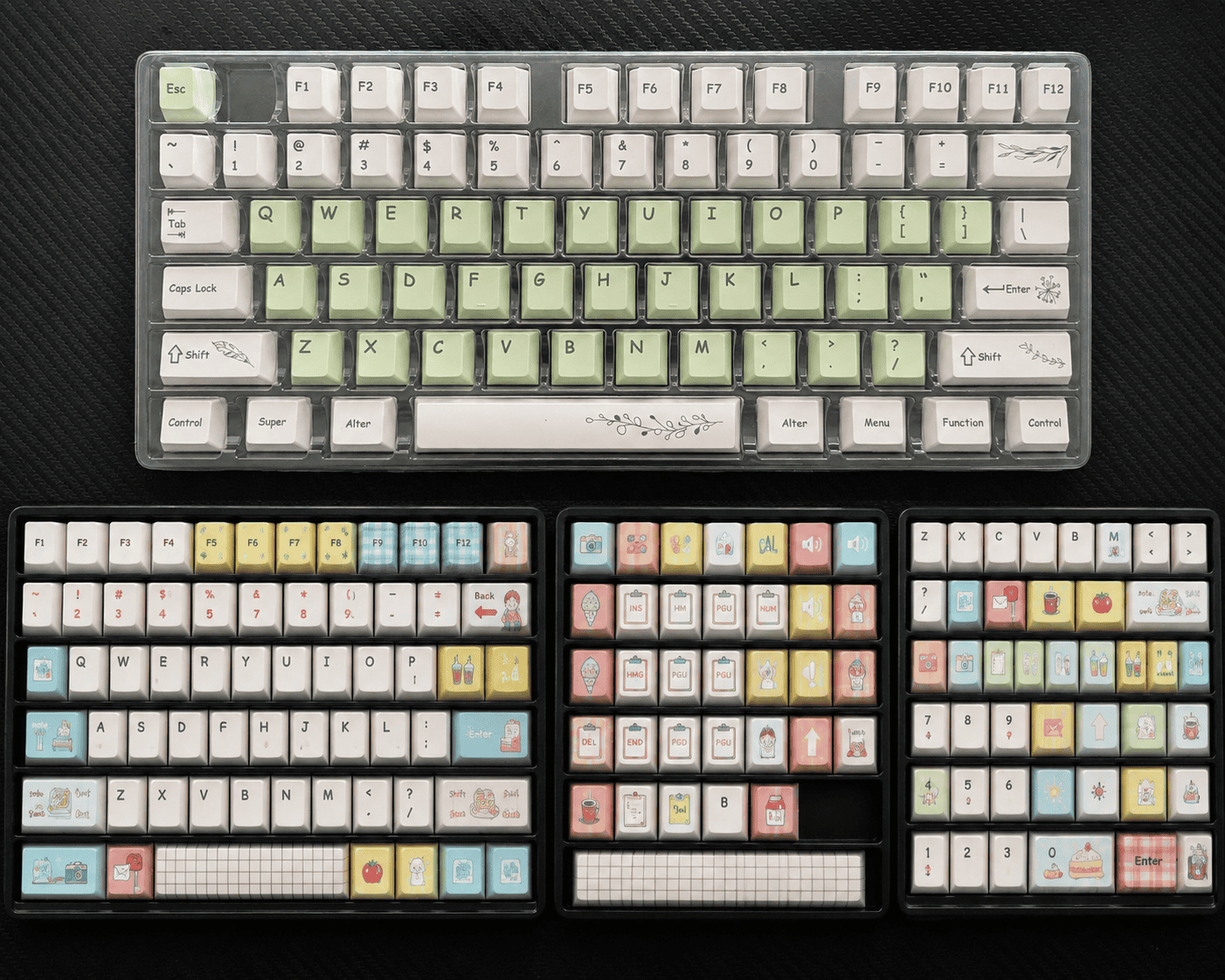
The stock keycaps that ship with the Muse75 Pro are clean and functional, but the Journal and Herbary sets are where PIIFOX’s aesthetic-first identity really shows up. The Journal set leans into a warm, muted, paper-and-ink-inspired palette — it makes the board feel more like a considered writing tool than a gaming peripheral, which fits naturally if your desk setup leans toward a cozy, analog-inspired vibe. The Herbary set takes a softer, botanical direction — think sage greens and cream tones — and gives the same board a completely different, calmer personality without touching a single internal component.
Swapping between the two took only a few minutes with the included keycap puller, and it’s a good demonstration of why PIIFOX treats keycaps as “core to their design culture” rather than an afterthought accessory: the same physical keyboard can believably pass as two entirely different desk aesthetics, just by changing what’s on top. If you’re someone who likes to refresh your setup seasonally, or match your keyboard to a broader desk theme, this is a genuinely compelling reason to consider the extra keycap sets alongside the board itself — though it’s worth remembering they’re a separate purchase from the keyboard, not something that ships in the box by default.
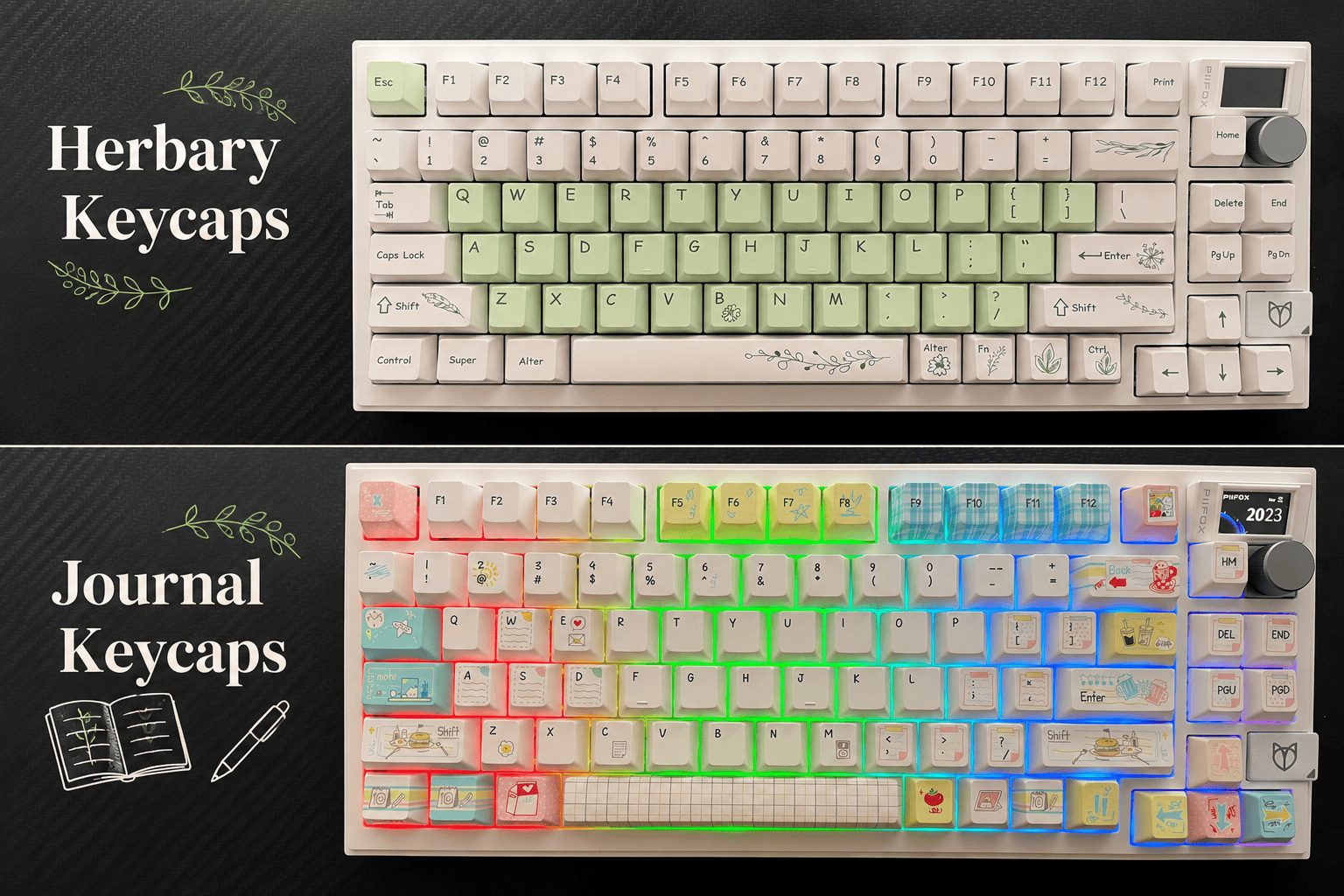
[Image: Muse75 Pro with Journal Keycaps set installed, and with Herbary set installed]
Where PIIFOX’s Brand Philosophy Actually Shows Up
PIIFOX has been vocal about the idea that a keyboard should be more than a functional tool — it should reflect something about the person using it. It’s easy for that kind of brand messaging to feel like marketing fluff bolted onto an otherwise ordinary product, but on the Muse75 Pro, it genuinely shows up in the product decisions: the customizable LCD GIF screen, the available colorways (white and black), and the broader LUNA series positioning as the board for “work, play, and every desk setup in between.”
If you’re the kind of person who already thinks about desk aesthetics — matching keycap sets, desk mats, ambient lighting — this is a board built with that mindset specifically in mind, not a purely function-first tool that happens to have RGB as an afterthought.
Pros and Cons
What stands out:
- Genuinely large 8000mAh battery — real multi-day use, not marketing-spec exaggeration
- Tri-mode connectivity covers every realistic use case
- Custom switches and dampening layers deliver a sound and feel well above what the price suggests
- The LCD GIF screen is a legitimately fun, distinctive personalization feature
- Metal control knob feels premium, not tacked-on
Where to temper expectations:
- The 75% layout means no numpad — a dealbreaker if you do heavy spreadsheet or numeric data entry
- The LCD screen and knob are extras that some minimalist typists simply won’t use day-to-day
- If you want a linear, ultra-fast competitive gaming feel, PIIFOX’s FORX line (their magnetic switch, Hall Effect series) is a more specialized choice than this board.
Who This Keyboard Is Actually For
Get it if: you want one keyboard that covers work, gaming, and a laptop on the couch equally well, you care about your desk having a bit of personality, and you want genuine multi-day battery life without babysitting a charge cable.
Consider something else if: you need a numpad for daily work, or you’re specifically chasing the fastest possible competitive gaming switch technology rather than an all-rounder.
Final Verdict
The PIIFOX Luna Muse75 Pro succeeds at something genuinely difficult: being a board that looks like it was designed around vibe and personality first, while still holding up as a legitimately well-built daily driver underneath. The tri-mode connectivity and 8000mAh battery alone would make it a solid pick for anyone juggling multiple devices, and the custom switches and dampening give it a sound and feel that punches above its price point. It’s not trying to be a specialized competitive gaming board or a minimalist’s dream — it’s aiming for the desk setup that wants to feel like yours, and on that front, it delivers.
You can check current colorways and pricing on the Luna Muse75 Pro product page.



Share Your Views: